Infinite Campus Parents
Stay Connected with Infinite Campus Parent
You can take advantage of the Campus Parent web and mobile app. Campus Parent gives parents real-time information, including attendance, grades, and assignments. Parents can keep up with assignments and track their child's progress. Check out this video to learn more about navigating through the Parent Portal.
How do I get started?
- Download the Campus Parent app on iOS or Android, or head to:
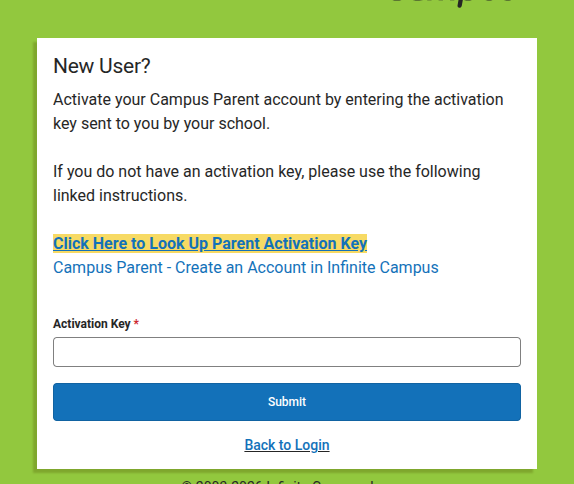
https://200.ncsis.gov/campus/portal/parents/psu200cherokee. jsp - Click/Tap on "New User?" You are taken to a screen with a text box for an activation key. DO NOT CLOSE THIS PAGE IF YOU ARE ON WEB!
- Click/Tap on the highlighted text that says "Click Here to Look Up Parent Activation Key"
- Enter the student's first name, last name, grade level (in the school year), student ID number (what they use to log into RapidIdentity), and the student's date of birth.
- A screen showing approved family members will appear. Click/tap on the name you want to choose. The activation key will appear. Write down or copy the key, then paste it into the previous screen.
- Create your Campus Parent Account. If you have the option, save your username and password.
- Go back to the login page. Enter the correct information.
- Complete the Online Registration before you can access your parent portal.
- Review any pop-up notifications before entering your parent portal.
- Enjoy staying connected to your child's education.